
Cross-Campaign Behavior
Cross-Campaign Behavior helps you coordinate multiple survey campaigns. You can define the order in which users see surveys, prevent overlapping survey experiences, and give certain surveys priority when several match at the same time.
You can find these settings in the Advanced Options tab of the Survey Editor.
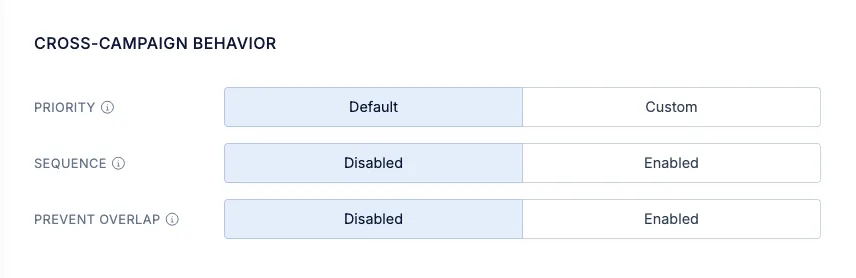
Three options are available:
- Sequence makes a survey eligible after users have seen selected surveys.
- Prevent Overlap excludes users based on their interactions with other surveys.
- Priority determines which survey takes precedence when multiple surveys match their trigger conditions at the same moment.
Priority
Section titled “Priority”Use Priority to give certain surveys precedence when two or more surveys match their trigger conditions for the same user at the exact same moment.
For example, an NPS survey and a product feedback survey might both match when a user visits a page. If the product feedback survey has a higher priority, it takes precedence over the NPS survey.
Configure the survey’s Priority in the Cross-Campaign Behavior section.
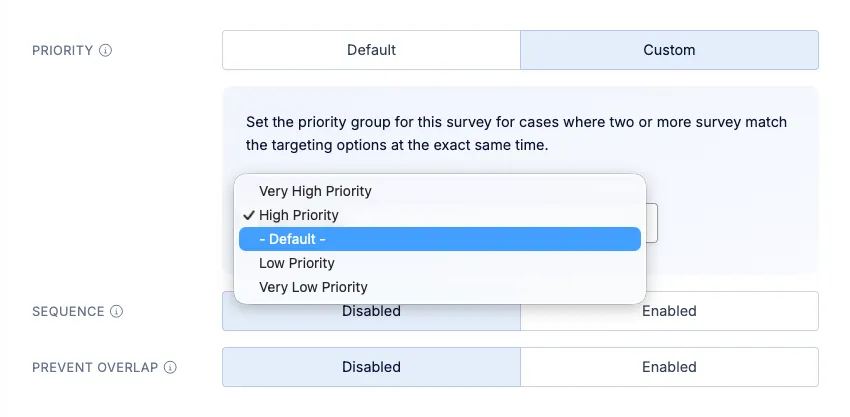
Priority applies only when multiple surveys match at the same moment. It does not define a sequence between campaigns or exclude users based on previous survey interactions.
Sequence
Section titled “Sequence”Use Sequence to show a survey only after users have seen selected survey campaigns.
You can also set a waiting period between campaigns. For example, you could make a follow-up survey eligible seven days after a user has seen your Product Satisfaction survey.
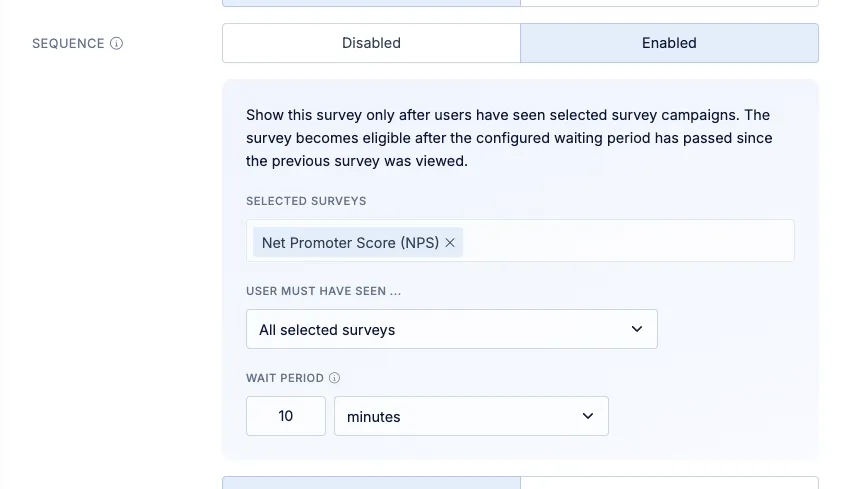
The following settings are available:
- Selected surveys: Choose the campaigns users must have seen before this survey becomes eligible.
- User must have seen: Choose whether users must have seen all selected surveys or any of them.
- Wait period: Define how much time must pass after the prerequisite survey was viewed.
Sequence adds an eligibility condition. Users must still meet the survey’s other targeting and trigger conditions before it can be shown.
Combine Sequence with user segments:
Sequence is based on whether users have seen another survey. It does not determine eligibility based on their answers.
To target users based on a previous response, use a user segment as the survey’s Target Audience.
For example, to ask satisfied users for more feedback, create a segment containing users who gave a high NPS score. Use that segment as the Target Audience, then configure Sequence to add a waiting period after the NPS survey was viewed.
Prevent Overlap
Section titled “Prevent Overlap”Use Prevent Overlap to exclude users who have already seen or responded to selected survey campaigns.
This is useful when campaigns cover similar topics or reach users through different channels. For example, you can exclude users from an in-app survey if they have already responded to a related email survey.
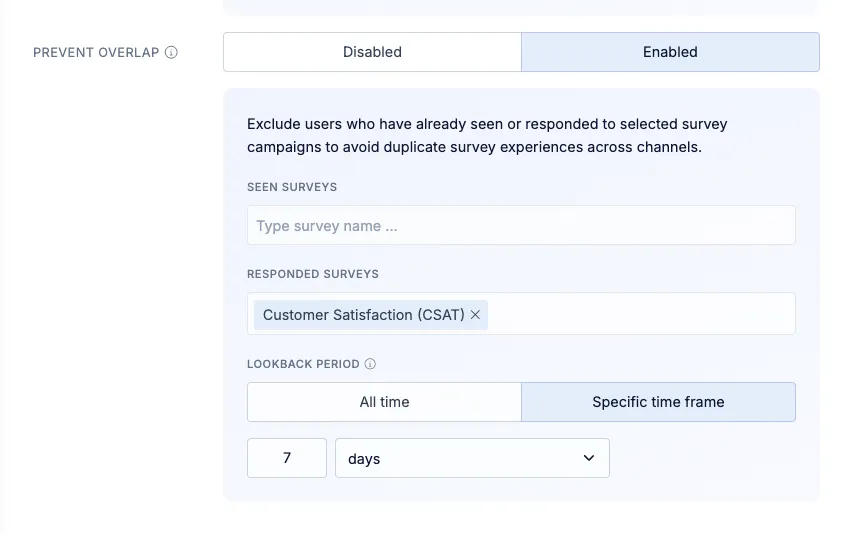
The following settings are available:
- Seen surveys: Exclude users who have seen one or more selected campaigns.
- Responded surveys: Exclude users who have responded to one or more selected campaigns.
- Lookback period: Limit the exclusions to recent interactions.
By default, all past interactions with the selected surveys are considered. Enable Lookback time to consider only interactions within a defined period.
For example, a 30-day lookback period lets you exclude users who have seen or responded to a selected survey within the last 30 days. Older interactions do not exclude them.
Choose the right option
Section titled “Choose the right option”| Your goal | Option |
| Give one survey precedence when several match at the same moment | Priority |
| Show a survey after users have seen another campaign | Sequence |
| Exclude users who have seen or responded to another campaign | Prevent Overlap |
You can combine these options to coordinate your campaigns. For example, use Sequence to make a follow-up survey eligible after an initial campaign, Prevent Overlap to exclude users who recently answered a similar survey, and Priority to give the follow-up precedence if another survey matches at the same moment.