Metadata Collection
To protect end-user privacy, Refiner does not collect user metadata by default. If needed, you can enable automatic metadata collection in your project settings.
Metadata can be stored on Contact records, Survey Responses, or both. Go to Settings > Data Settings and enable the individual data points you want Refiner to collect.
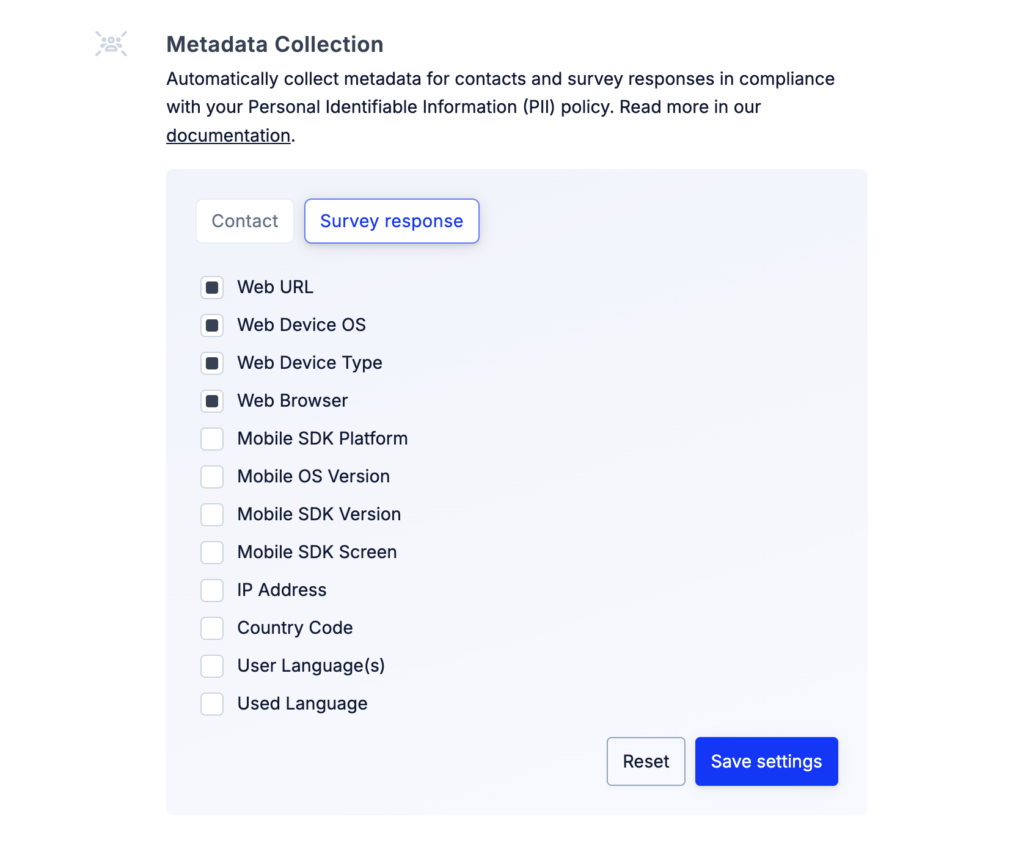
Once enabled, Refiner automatically collects the selected information about your users and their environment. This data can be used to segment users, analyze survey results, and better understand the context in which responses were submitted.
The following metadata fields are available:
| Field name | Identifier | Description |
|---|---|---|
| First seen at | first_seen_at | Timestamp of the user’s first recorded activity. |
| Last seen at | last_seen_at | Timestamp of the user’s most recent activity. |
| Survey views count | form_views_count | Total number of surveys viewed by the user. |
| Survey responses count | form_submissions_count | Total number of surveys submitted by the user. |
| Last survey response | last_form_submission_at | Timestamp of the user’s most recent survey submission. |
| Last survey view | last_form_view_at | Timestamp of the user’s most recent survey view. |
| Country code | country | Two letter country code (ISO 3166) determined from the user’s IP address. |
| Current screen | current_screen | Screen the user is currently viewing (mobile SDK only). |
| Current URL | current_url | URL of the page where the survey is displayed (web only) |
| IP address | ip_address | IP address of the user at the time of the session. |
| User language(s) | locale | User’s browser or device preferred languages setting (e.g., “en,de,fr”) or the value you’ve set using setLocale method. |
| Language used | locale_used | The actual language used to display the survey to the user. |
| Mobile OS version | mobile_os_version | Version of the mobile operating system. |
| Mobile Platform | mobile_platform | Platform type on mobile (e.g., iOS, Android). |
| Mobile SDK version | mobile_sdk_version | Version of the Refiner mobile SDK in use. |
| Web Browser | web_browser | Web browser used by the user (e.g., Chrome, Safari). |
| Web Device OS | web_device_os | Operating system of the user’s device (e.g., macOS, Windows). |
| Web Device Type | web_device_type | Type of device used (e.g., desktop, tablet, mobile). |
If you want to collect the same information but store it under a different data field, you can use Context Variables with our JavaScript SDK, Mobile SDK or Survey Pages.