
Pageviews
Refiner primarily uses Monthly Active Users (MAU) to determine your subscription tier. For most customers, MAU is the only usage metric that matters.
Pageviews are relevant only when you install Refiner’s JavaScript SDK on a public website without identifying your visitors.
In this scenario, Refiner receives traffic from anonymous website visitors that cannot be counted as individual active users. We therefore track Pageviews as an additional usage metric.
MAU is our primary billing metric
Section titled “MAU is our primary billing metric”For the vast majority of customers, Pageviews are not a determining factor in pricing.
The Pageview allowance mainly acts as an abuse-prevention and infrastructure safeguard. It protects Refiner from unexpectedly large amounts of anonymous traffic—for example, when our JavaScript SDK is installed across a very high-traffic public website.
Each subscription includes a generous Pageview allowance of 20x your MAU limit.
For example:
- A plan with 5,000 MAU includes 100,000 Pageviews
- A plan with 10,000 MAU includes 200,000 Pageviews
- A plan with 50,000 MAU includes 1,000,000 Pageviews
If your website naturally generates more Pageviews than your plan includes, this is usually not a problem. Contact our support team and we can often increase your Pageview allowance free of charge.
When are Pageviews counted?
Section titled “When are Pageviews counted?”Pageviews are counted when Refiner’s JavaScript SDK is loaded on a public website for anonymous visitors.
A Pageview is recorded whenever a visitor loads a page on which the Refiner web client is installed. This happens regardless of whether a survey is displayed on that particular page.
Pageviews are therefore typically relevant for use cases such as:
- Website feedback surveys
- Website visitor surveys
- Marketing attribution surveys
- Surveys shown to anonymous visitors on landing pages or other public pages
If you use Refiner inside a logged-in application and identify your users, usage is measured primarily through MAU instead of Pageviews.
Frequently Asked Questions
Section titled “Frequently Asked Questions”Where can I see my Pageview usage?
Section titled “Where can I see my Pageview usage?”
Where can I see my Pageview usage?
Section titled “Where can I see my Pageview usage?”If Refiner is currently counting Pageviews for your account, you can see the current Pageview count under My Account > Subscription.
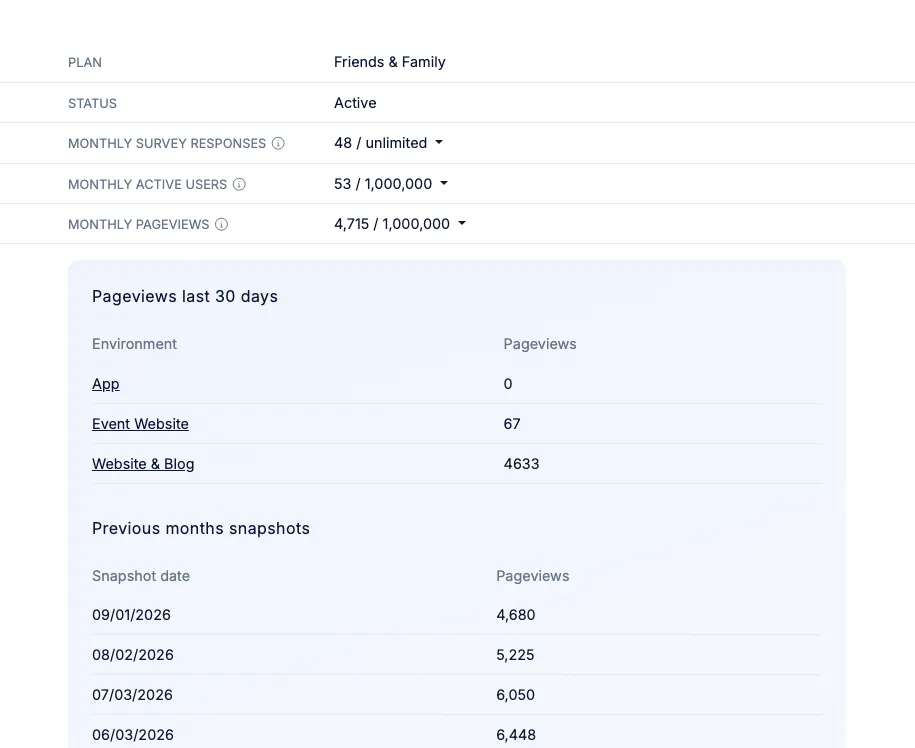
Click the Pageview count to open a detailed usage breakdown.
The breakdown shows:
- Which Environments are generating Pageviews
- Snapshots of your total Pageview usage from previous months
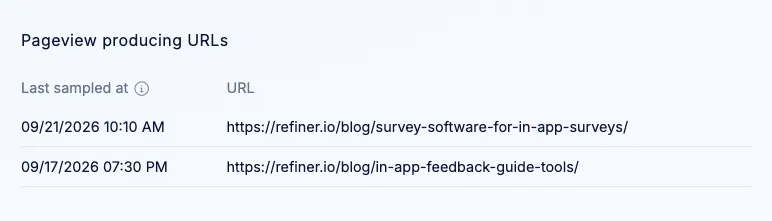
- The URLs generating Pageviews, helping you identify where Refiner is being loaded
This can be particularly useful if your Pageview usage is higher than expected.
Can I see which website pages generate Pageviews?
Section titled “Can I see which website pages generate Pageviews?”
Can I see which website pages generate Pageviews?
Section titled “Can I see which website pages generate Pageviews?”Yes. The Pageview breakdown shows the website URLs that are currently generating Pageviews in your account.
To keep this information lightweight, we sample approximately one out of every 1,000 Pageview requests. The URL list therefore provides a representative overview of where Pageviews are coming from rather than a complete log of every individual request.
How can I reduce my Pageview usage?
Section titled “How can I reduce my Pageview usage?”
How can I reduce my Pageview usage?
Section titled “How can I reduce my Pageview usage?”If you do want to reduce Pageview usage, the simplest option is to load the Refiner JavaScript SDK only on the pages where you intend to run surveys.
For example, if you only want to survey visitors on your pricing and signup pages, you can avoid loading Refiner across the rest of your public website.
Before making implementation changes solely to stay below your Pageview allowance, we recommend contacting us. Increasing your Pageview limit is often the simpler solution and can usually be done free of charge.
What happens if I exceed my Pageview limit?
Section titled “What happens if I exceed my Pageview limit?”
What happens if I exceed my Pageview limit?
Section titled “What happens if I exceed my Pageview limit?”Pageview limits are primarily designed to protect against unusually high levels of anonymous website traffic rather than to generate overage charges.
If you expect to exceed your included allowance—or already have—please contact our support team.
We can review your usage and, in most cases, increase the Pageview allowance to accommodate your website traffic.