
Create Response Lists
Introduction
Section titled “Introduction”Response lists save a combination of filters on the Survey Responses page, so you and your team can get back to the same view in one click. For example, you could create a list for detractors of your NPS survey, one for open feature requests, and one for feedback from enterprise accounts.
Response lists are shared with all team members who have access to the same Refiner environment.
Switch between lists
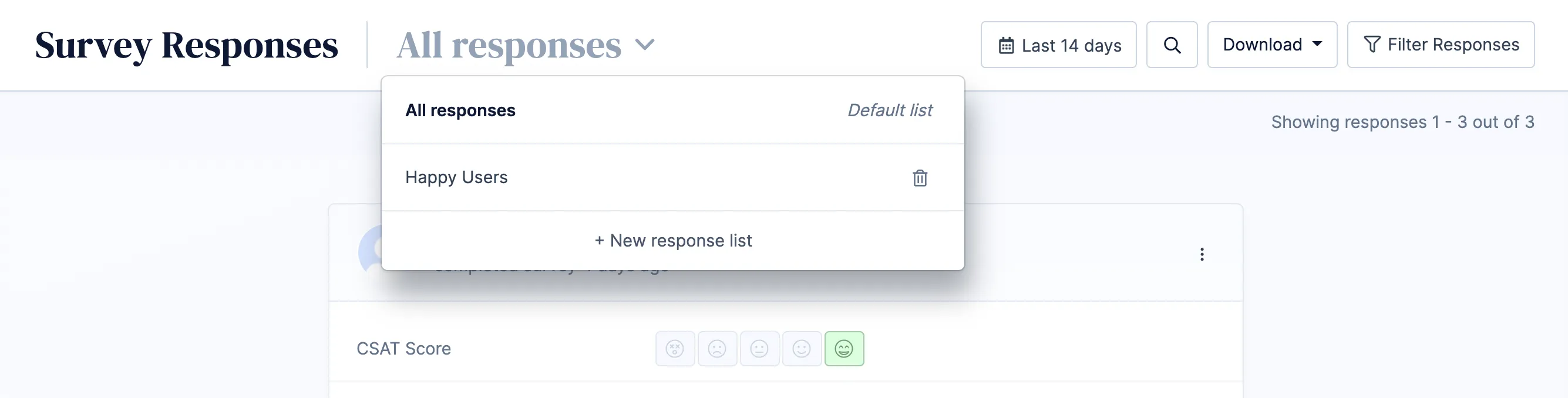
Section titled “Switch between lists”The dropdown next to the page title shows all saved lists. All responses is the default list. It shows every response without filters.
Create a list
Section titled “Create a list”- Open the list dropdown next to the page title and click + New response list. You can also start from any existing list.
- Set up your filters in the filter sidebar. See Data Filters for all available filters.
- Click Save list settings in the top navigation. The button appears as soon as you change a filter.
- Enter a name for the list and choose a default timeframe.
- Click Save.
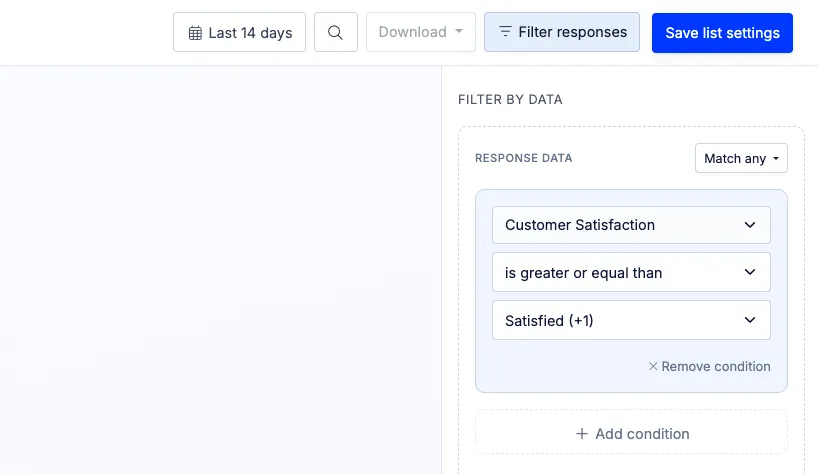
A response list saves all settings of the filter sidebar: data conditions, included and excluded surveys, tags and segments, and the types of responses to include in the list.
The default timeframe is the date range a list opens with, for example “Last 30 days” or “This quarter”. You can still change the date range in the top navigation while you look at the list.
Update a list
Section titled “Update a list”To change a saved list, open it, adjust the filters and click Save list settings. You can then choose between:
- Update this response list: Overwrites the saved list with your changes.
- Create new response list: Saves your changes as a new list and keeps the original list unchanged.
To rename a list or change its default timeframe, open the list dropdown and click the edit icon next to the list.
Delete a list
Section titled “Delete a list”Open the list dropdown and click the trash icon next to the list you want to delete. Deleting a list only removes the saved filters. The survey responses themselves are not deleted.