
MCP Server
Introduction
Section titled “Introduction”The Refiner MCP Server is an implementation of the Model Context Protocol that enables AI agents to securely interact with your Refiner account.
It acts as a bridge between LLM-powered agents and customer feedback data, allowing automation of analytics, user management, and survey workflows through natural language.
At a high level, this server exposes Refiner survey response data as structured tools that AI agents can discover and invoke dynamically.
How to use our MCP server
Section titled “How to use our MCP server”With the Refiner MCP Server, you can connect your Refiner workspace directly to AI tools like ChatGPT and Claude to analyze survey responses on demand using natural language. This enables ad-hoc exploration of feedback data, from summarizing open-text responses to identifying trends and anomalies in real time.
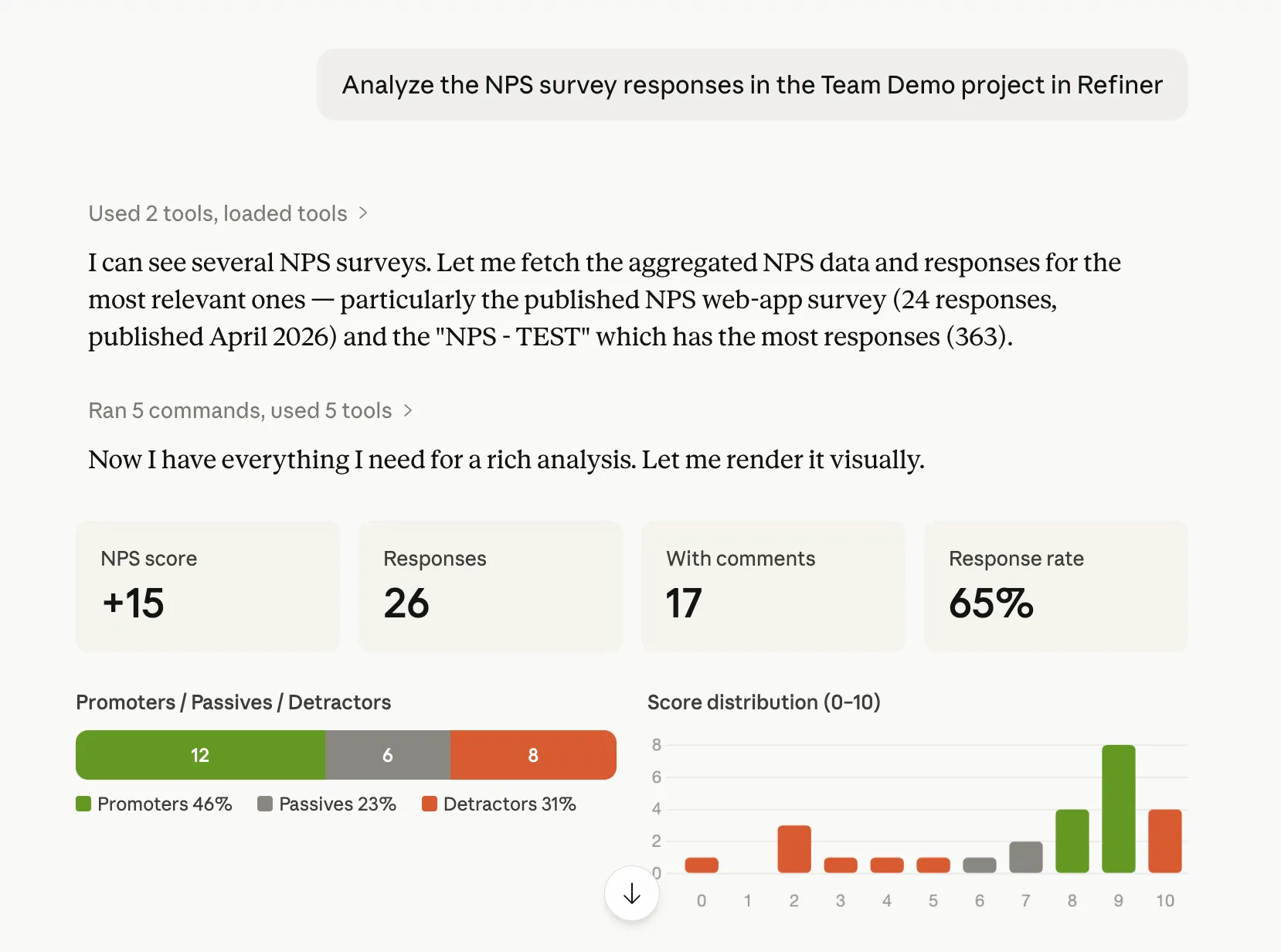
Beyond analysis, you can power workflow automations – such as triggering actions based on new responses or syncing insights across systems – using tools like Claude Code. The result is a more dynamic, AI-driven feedback loop where insights can be generated and acted upon instantly without manual intervention.
MCP server endpoint
Section titled “MCP server endpoint”The Refiner MCP server is reachable under the following URL:
https://app.refiner.io/v001/mcpAuthentication
Section titled “Authentication”Refiner MCP uses OAuth 2.0 Authorization Code + PKCE.
Discovery endpoints
Section titled “Discovery endpoints”https://app.refiner.io/.well-known/oauth-authorization-serverhttps://app.refiner.io/.well-known/oauth-protected-resourcehttps://app.refiner.io/.well-known/oauth-protected-resource/v001/mcp
Scopes
Section titled “Scopes”mcp:projects-read– list accessible environments/projectsmcp:forms-read– read surveys/formsmcp:responses-read– read individual responsesmcp:reporting-read– read aggregated reporting data
All tools are read-only and registered in RefinerServer. Call get-projects first; use each returned uuid as project_uuid for the other tools and for resource URIs under refiner://project/{project_uuid}/.... All timestamps returned by the MCP server are in UTC.
get-projects
Section titled “get-projects”List all projects (environments) the authenticated user can access.
- Scope:
mcp:projects-read - Input: none
- Output:
items[]withuuid,name - Read-only
- Not destructive
get-forms
Section titled “get-forms”List surveys (forms) in a project. Requires project_uuid from get-projects. Available lists: all, all_with_archived, archived, published, drafts.
- Scope:
mcp:forms-read - Input:
project_uuid, optionalpage,list list:all,all_with_archived,archived,published,drafts- Read-only
- Not destructive
get-traits
Section titled “get-traits”List attributes (data fields) in a project. Requires project_uuid from get-projects. Use attribute slugs or UUIDs in response_data, contact_data, or account_data filters on get-responses and get-aggregated-response-data.
- Scope:
mcp:projects-read - Input:
project_uuid, optionalinclude include:all,form,contact,account- Read-only
- Not destructive
get-segments
Section titled “get-segments”List user segments in a project. Requires project_uuid from get-projects.
- Scope:
mcp:projects-read - Input:
project_uuid - Read-only
- Not destructive
get-tags
Section titled “get-tags”List response tags in a project. Requires project_uuid from get-projects.
- Scope:
mcp:projects-read - Input:
project_uuid - Read-only
- Not destructive
get-responses
Section titled “get-responses”Get a list of survey responses. Requires project_uuid from get-projects. Filter by form UUIDs (surveys), segment UUIDs, tag UUIDs, and date range. Filter by survey answers, contact traits, and account traits with response_data, contact_data, and/or account_data (keys are attribute slugs or UUIDs from get-traits). Returns up to 500 responses per page. Contact data is excluded from the payload for privacy reasons. The date range defaults to the past 30 days and can extend back up to 12 months.
- Scope:
mcp:responses-read - Input:
project_uuid, optionalform_uuids,segment_uuids,tag_uuids,date_range_start,date_range_end,page,page_cursor,response_data,contact_data,account_data - Notes:
- UUID filters can be comma-separated strings
- defaults to last 30 days
- max lookback 12 months
- up to 500 responses/page
- contact data excluded for privacy
- Read-only
- Not destructive
get-aggregated-response-data
Section titled “get-aggregated-response-data”Get aggregated reporting and chart data. Requires project_uuid from get-projects. Filter by form UUIDs (surveys), segment UUIDs, tag UUIDs, question identifiers, and date range. Filter by survey answers, contact traits, and account traits with response_data, contact_data, and/or account_data (keys are attribute slugs or UUIDs from get-traits). Chart types: nps, csat, ratings, count, distribution. The date range defaults to the past 30 days and can extend back up to 12 months.
- Scope:
mcp:reporting-read - Input:
project_uuid, requiredtype, optionalform_uuids,segment_uuids,tag_uuids,question_identifiers,date_range_start,date_range_end,response_data,contact_data,account_data type:nps,csat,ratings,count,distribution- Read-only
- Not destructive
Resources
Section titled “Resources”Resources provide URI-based reads for MCP clients that support resources. Prefer the matching tools when available.
Available Resources:
refiner://projects— list all projects (environments) the authenticated user can accessrefiner://project/{project_uuid}/forms— list all surveys (forms) in a projectrefiner://project/{project_uuid}/form/{form_uuid}— get a single survey (form) by UUIDrefiner://project/{project_uuid}/segments— list all user segments in a projectrefiner://project/{project_uuid}/tags— list all response tags in a project
Behavior:
- MIME type:
application/json - Same scope and project-access checks as corresponding tools
- Consistent structured responses and explicit access errors
Sample prompts
Section titled “Sample prompts”Refiner exposes built-in MCP prompts to guide robust multi-step analysis workflows.
Built-in prompts
Section titled “Built-in prompts”nps_get_score_and_countscsat_get_score_and_countsmultiple_choice_response_distributionretrieve_survey_responsesnps_analyze_verbatimcsat_analyze_verbatimanalyze_open_ended_text_responses
Example user prompts
Section titled “Example user prompts”- “List my available Refiner environments and surveys.”
- “Show NPS score and detractor/passive/promoter counts for the last 30 days.”
- “Analyse recent NPS open-text verbatim and tell me which are the biggest drivers for the current score. Tell me what we do right and what we can improve based on the open-text verbatim.”
- “What is our current CSAT score in the X project in Refiner?”
- “Show CSAT score and distribution for survey X in Q1.”
- “Retrieve responses tagged churn-risk from the past 14 days.”
- “Analyze open-ended feedback and suggest top improvement actions.”
- “Show multiple-choice response distribution for question onboarding_experience.”