Chattermill Integration
Chattermill is a customer feedback analysis platform that brings together feedback from surveys, support conversations, reviews, and other sources. It uses AI to identify themes and sentiment, helping teams understand what customers are saying and where to make improvements.
The Refiner integration sends completed survey responses to Chattermill for analysis alongside feedback from your other connected sources.
Popular use cases
- Identify recurring requests and pain points in open-text survey answers.
- Understand the feedback behind NPS and CSAT scores.
- Compare themes across survey feedback and other channels to prioritize product and customer experience improvements.
How it works
When a survey covered by the integration is completed, Refiner sends the response data to Chattermill. Your team can include that feedback in its Chattermill analysis without manually exporting responses from Refiner.
The integration sends data from Refiner to Chattermill. Feedback collection and survey management remain in Refiner, while Chattermill provides the analysis.
Set up the integration
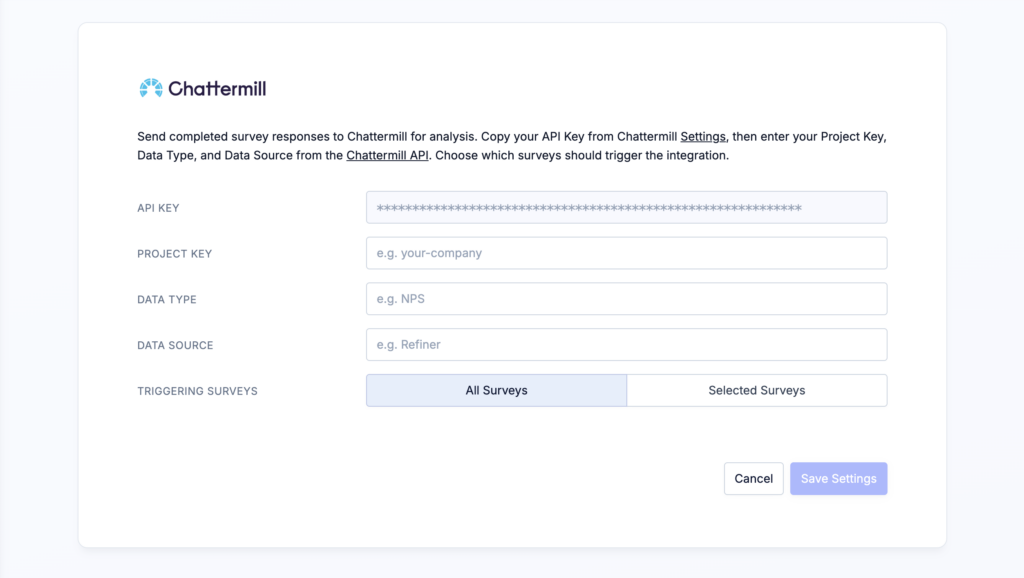
- In your Refiner environment, open Integrations and select Chattermill.
- Copy your API Key from the Settings page in Chattermill and paste it into Refiner. See Chattermill’s instructions for getting an API key.
- Enter the Project Key, Data Type, and Data Source for the destination dataset in Chattermill. Refer to the Chattermill API documentation for these values, or ask your Chattermill team if you are unsure which dataset to use.
- Choose whether to sync responses from all surveys or selected surveys.
- Click Save Settings.
Complete one of the selected surveys and check that its response appears in the intended Chattermill dataset. You can update the survey selection at any time in the integration settings.