Download Survey Responses
Introduction
Refiner offers several ways to export survey response data. The most straightforward option is to download it as a spreadsheet file in either Excel (XLS) or CSV format.
Please note: In addition to survey responses, you can also download user profiles.
The Survey Responses page includes a download option in the top-right corner. This is the primary method most customers use to export their survey response data for analysis or reporting.
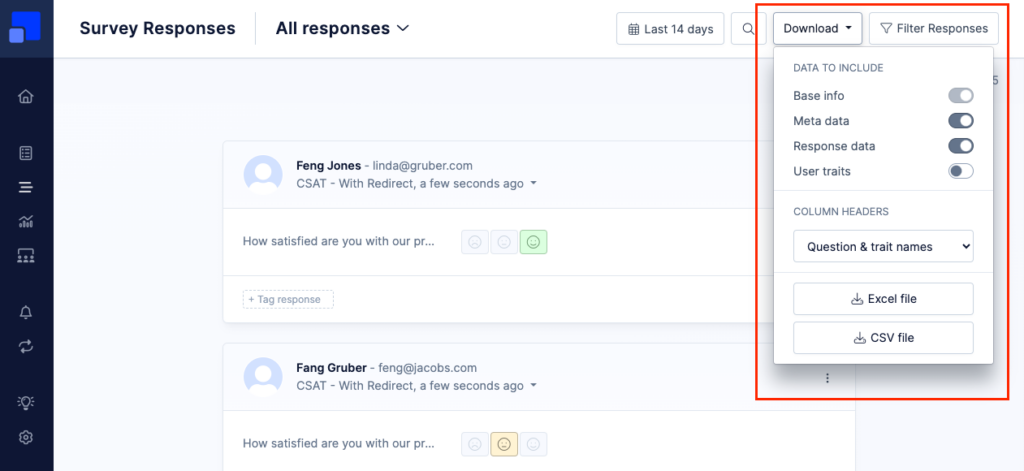
The exported file includes all survey responses that match the date range selected in the top navigation, as well as any filter conditions applied in the right sidebar.
The “last shown” date is used as the reference point for ordering and filtering survey responses. Keep in mind that the “last shown” date of a response can change over time – for example, when using Follow-Up Mode.
You can choose which data fields to include in the export. The following column groups are available:
- Base Info: User ID, survey name, and the date the response was received
- Meta Data: Detailed information about survey exposure, such as when the user first saw the survey and how often it was shown
- Response Data: The actual answers provided by the user
- User Traits: All additional data stored for the user who responded to the survey
You can also decide whether question labels or question identifiers should be used as column headers. Depending on how your account is set up, using identifiers may result in a spreadsheet that is easier to scan or process programmatically.
In addition to downloading survey responses as spreadsheet files, you can also access this data through our backend API. You’ll find more information and detailed API documentation here.